Live Playback
To play a live stream from the Quickplay Platform, follow the steps described in Secure Playback, and update the platform asset to indicate you're trying to play a Live stream.
You can construct a PlatformAsset for playing a Live Stream with APIs from ContentAuthorizer by providing the following:
- Content Id: Unique identifier of the content
- Media Format: HLS | DASH | SmoothStream
- DRM: Fairplay | Widevine
- Content Type: Live
- Catalog Type: channel | event | sportsliveevent
- Playback Mode: Live | Restart | Catchup
- Start Time: Start time of the Live Program
- Required for playback modes
restartandcatchup, optional otherwise
- Required for playback modes
- End Time: End time of the Live Program
- Required for playback mode
catchup, optional otherwise
- Required for playback mode
// create asset
 val platformAsset = PlatformAsset(
   contentId,
   MediaType.DASH,
   consumptionType,
   catalogType,
   DrmType.WIDEVINE,
   PlaybackMode.LIVE
 )
Seek in live streams
When playing a Live stream, the player always starts playing from the Live Edge. To seek anywhere within the live window, you can use the standard seek APIs. For details, see Basic Playback. The seek position is always relative to the start of the live window. The player tries to maintain the same live offset after a seek.
To force the player to play from the Live Edge of the current Live Window, use the seekToLiveEdge API. You can use the currentOffsetFromLiveEdgeMs API to determine if the player is currently playing at or near the Live Edge.
Player APIs for live playback positions:
| Property Name | Type | Description |
|---|---|---|
| currentEpochTimeMs | Long | Current time expressed in epoch. |
| currentOffsetFromLiveEdgeMs | Long | The time difference between current playback position and live edge position, in milliseconds. |
| currentTimeInWindowMs | Long | The current playback position (in milliseconds) expressed within the limits of the current live window. |
| currentWindowDurationMs | Long | The total duration of the current live window, in milliseconds. |
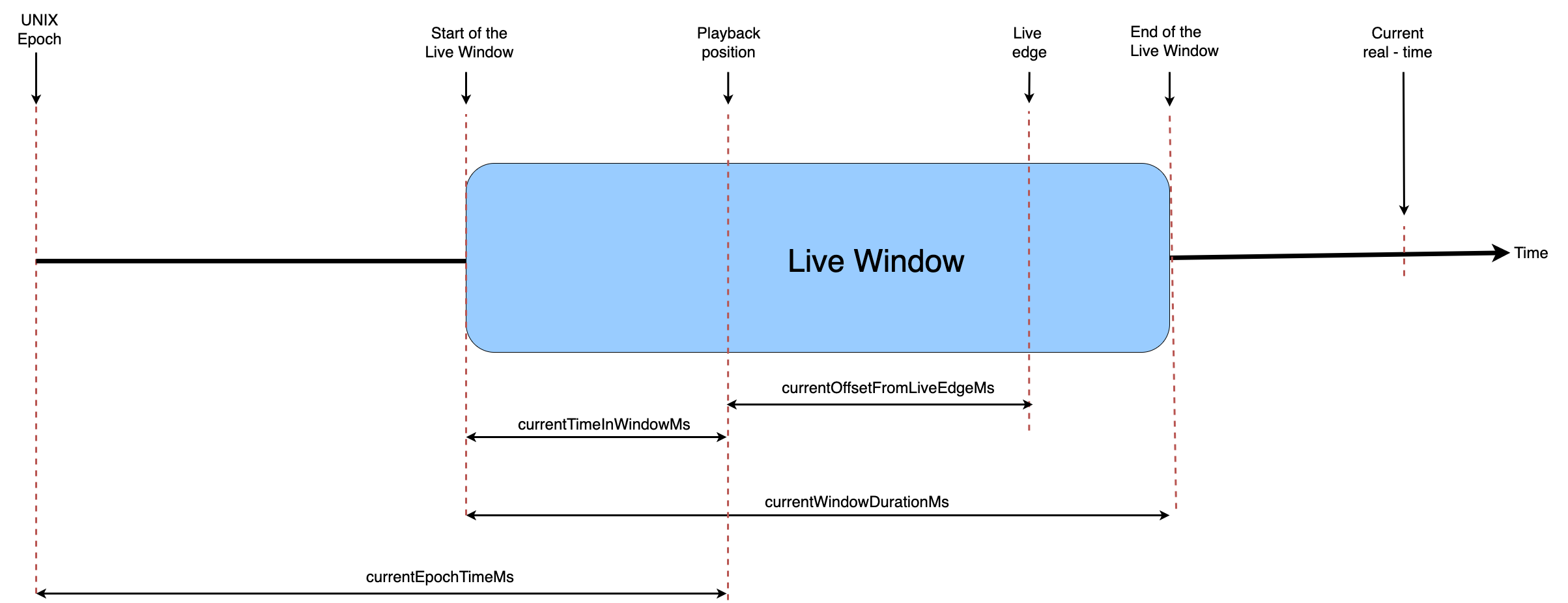
Live seeking is limited to the duration of the current live window (currentWindowDurationMs).
If you seek to, pause and resume, or buffer to any playback position behind the live window, the player throws a 0x40020d error.
Listen to end of live stream
When playing a live program or event, the Quickplay platform authorizes the playback for the current program or event. You must re-authorize any subsequent program or event.
During live playback, you can observe StreamTimelineEvent.LIVE_PROGRAM_END with Action.NONE by implementing the following in the attached Player.Listener.
override fun onEventReceived(
    streamTimelineEvent: StreamTimelineEvent,
    suggestedAction: Action,
    streamTimelineEventMetadata: StreamTimelineEventMetadata?
) {
    when(streamTimelineEvent) {
        is StreamTimelineEvent.LIVE_PROGRAM_END -> {
            //Handle end of live stream as required
        }
    }
}
Live Playback Modes
You can classify live playback into three modes: Live, Restart, and Catchup modes. Though the level of control changes
depending on the playback mode, all modes support playback controls like pause and scrub.
Live mode
You should use Live mode when you expect the playback to be reasonably close to real time. You can configure the duration of buffer that should be
available (that is, the duration of playback behind real time that the player can play at all times) behind the live
edge as required on the server itself.
// create asset
 val platformAsset = PlatformAsset(
   contentId,
   MediaType.DASH,
   consumptionType,
   catalogType,
   DrmType.WIDEVINE,
   PlaybackMode.LIVE
 )
Since you expect the playback to follow real time as much as possible, it doesn't require you to pass a start or end time.
Restart mode
You should use Restart mode to join a live stream that has already started. In this mode, the entire length of the live stream
(that is, from start time to live edge) is available for the player. You must pass the start time from which the player should be able to play to the
SDK using PlatformAsset. The startTime and endTime must be in ISO8601 string format.
// create asset
 val platformAsset = PlatformAsset(
   contentId,
   MediaType.DASH,
   consumptionType,
   catalogType,
   DrmType.WIDEVINE,
   PlaybackMode.RESTART,
   startTime,
   endTime
 )
All restart playbacks start from live edge by default. Set the initial playback time preference to play the restart stream from any specific point instead of the Live Edge (real time).
Catchup mode
You should use Catchup mode to stream a live stream that has already ended but is still in the DVR window. In this mode, the entire
length of the live stream (that is, from start to end) is available for the player. You must pass the start and end times from which the player should be able to
play to the SDK using PlatformAsset. The startTime and endTime must be in ISO8601 string format.
// create asset
 val platformAsset = PlatformAsset(
   contentId,
   MediaType.DASH,
   consumptionType,
   catalogType,
   DrmType.WIDEVINE,
   PlaybackMode.CATCHUP,
   startTime,
   endTime
 )
The Player.seekToLiveEdge API is a no-op while playing a catchup stream. If you want to jump to the current live edge of a Catchup playback,
you must re-authorize the playback in Live mode and set up a new player instance.