Live Playback
To play a live stream from Quickplay Platform, follow the steps described in Secure Playback, and update the platform asset to indicate you're trying to play a Live stream.
You can construct a PlatformAsset for playing a Live Stream with APIs from ContentAuthorizer by providing the following:
- Content Id: Unique identifier of the content
- Media Format: HLS | DASH | SmoothStream
- DRM: Fairplay | Widevine
- Content Type: Live
- Catalog Type: channel | event | sportsliveevent
- Playback Mode: Live | Restart | Catchup
- Start Time: Start time of the Live Program
- Required for playback modes
restartandcatchup, optional otherwise
- Required for playback modes
- End Time: End time of the Live Program
- Required for playback mode
catchup, optional otherwise
- Required for playback mode
// create live streaming asset
let asset = FLContentAuthorizerFactory.platformAsset(contentId: contentId,
                                                    contentType: .live,
                                                    catalogType: "channel",
                                                    mediaFormat: .hls,
                                                            drm: .fairplay,
                                                   playbackMode: .live)
Seek in live streams
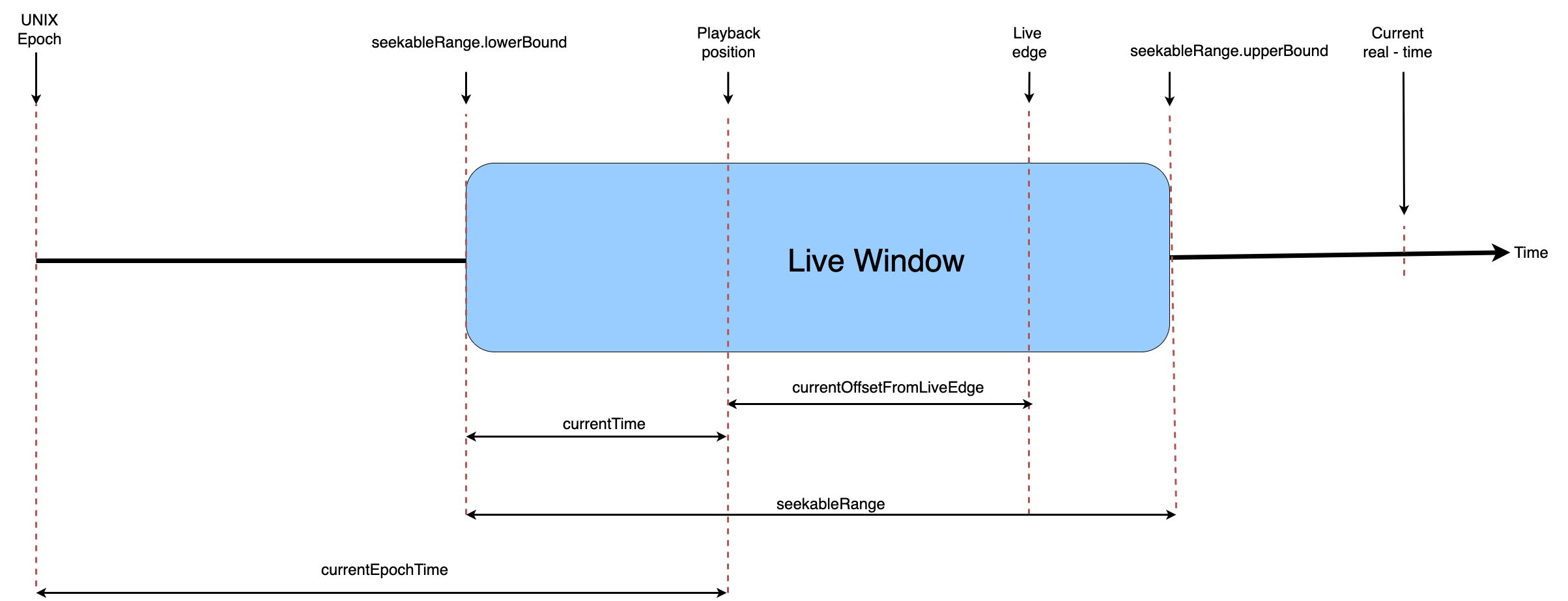
When playing a Live stream, the player always starts playing from the Live Edge. To seek anywhere within the live window, you can use the standard seek APIs, refer to Basic Playback. The seek position is always relative to the start of the live window. The player tries to maintain the same live offset after a seek.
To force the player to play from the Live Edge of the current Live Window, use the seekToLiveEdge API. You can use the currentOffsetFromLiveEdge API to determine if the player is currently playing at or near the Live Edge.
The following table describes Player APIs for live playback positions.
| Property Name | Type | Description |
|---|---|---|
| currentEpochTime | TimeInterval | Current time expressed in epoch |
| currentOffsetFromLiveEdge | TimeInterval | The time difference between current playback position and live edge position, in seconds |
| currentTime | TimeInterval | The current playback position (in seconds) expressed within the limits of the seekable range |
| seekableRange | Range<TimeInterval> | Live window range (lowerbound - window start in seconds, upperbound - window end in seconds) |
Listen to live program end
When playing a live program or event, Quickplay platform authorizes the playback for the current active program/event. The program/event should be re-authorized again.
When the current live program (restart, live modes) ends, the player notifies the delegate with the streamtimelineevent with eventName as StreamTimelineEvent.LIVE_PROGRAM_END.
func didReceive(event: StreamTimelineEvent, suggestedAction: Action, metadata: StreamTimelineMetadata?) {
  switch event {
  case .liveProgramEnd:
      // handle program end
  }
}
Playback Modes
Restart
If you're looking to offer Restart or Play from Beginning feature for your users, set up the asset as shown below. You must provide the startTime and endTime of the program in ISO8601 format.
// create live streaming asset
let asset = FLContentAuthorizerFactory.platformAsset(contentId: contentId,
                                                    contentType: .live,
                                                    catalogType: "channel",
                                                    mediaFormat: .hls,
                                                            drm: .fairplay,
                                                   playbackMode: .restart,
                                                      startTime: programStartTime,
                                                        endTime: programEndTime)
Set the initial playback time preference as zero to ensure the live stream plays from beginning of the Live Window instead of the Live Edge.
if let contentURL = URL(string: playbackAsset.contentUrl) {
    let avURLAsset = AVURLAsset(url: contentURL)
    let player = FLPlayer.player(asset: avURLAsset)
    // add player's playback view to your controller
    // player.playbackView

    player.set(preferences: [.initialPlaybackTime(time: 0.0)])

    player.play()
}
Setting any other positive value is interpreted as seconds from start of the stream. For instance, setting 300.0 starts the stream 5 minutes from the beginning of live window.
// Start stream 5 minutes from beginning of stream
player.set(preferences: [.initialPlaybackTime(time: 300.0)])
Catchup
If you're looking to offer Catchup on an already ended Live program for your users, set up the asset as shown below. The startTime and endTime indicate the program start time and end time respectively, and these are mandatory when trying to play in catchup mode. You must provide the startTime and endTime in ISO8601 format.
// create live streaming asset
let asset = FLContentAuthorizerFactory.platformAsset(contentId: contentId,
                                                    contentType: .live,
                                                    catalogType: "channel",
                                                    mediaFormat: .hls,
                                                            drm: .fairplay,
                                                   playbackMode: .catchup,
                                                      startTime: programStartTime,
                                                        endTime: programEndTime)
The seekToLiveEdge API is a no-op while playing catchup stream. If you're looking to jump to current live edge of a Catchup playback, you must re-authorize the playback in live playbackMode and set up a new player instance.