MediaTailor integration
MediaTailor Integration
QP player now supports playback of AWS Elemental MediaTailor curated streams with advertisements. To build a MediaTailor player, the following properties need to be configured:
Required Configuration
| Property | Type | Required | Description |
|---|---|---|---|
mediaTailorSessionURL | String | True | Sets the URL to create remote session with AWS Elemental MediaTailor. |
mediaURL | String | True | Sets the fallback URL to content playback when MediaTailor session fails. |
ssaiAdProvider | String | True | Specifies the Server-Side Ad Insertion (SSAI) provider for ad delivery. Set to "mediatailor". |
Basic Setup
Creation of MediaTailor player is simple by just providing content's URL along with session URL to create remote session with AWS Elemental MediaTailor:
let playerConfig: PlayerConfig = {
  ...
  mediaURL: <Content url>,
  mediaTailorSessionURL: <MediaTailor Session url>,
  ssaiAdProvider: 'mediatailor',
  adCuepointsSyncInterval: 0.3, // Optional: Sets the ad cuepoints sync interval (0.1 to 1.0 seconds, default: 0.3 seconds) for observing rewatched ad breaks during VOD playback. **iOS only.**
};
Advanced Integration
Applications can configure ad delivery and playback behavior by passing optional parameters through the player configuration. Below are few such optional configurations.
MediaTailorSessionConfiguration
The MediaTailorSessionConfiguration interface provides advanced configuration options for MediaTailor sessions:
| Property | Type | Required | Description |
|---|---|---|---|
reportingMode | ReportingMode | False | Sets reporting mode: fallback server mode ('serverFallback') or Datazoom mode ('server' / 'client') with required Datazoom fields. |
playerParams | { [key: string]: string } | False | Parameters for player session configuration |
originParams | { [key: string]: string } | False | Additional parameters for session initialization |
manifestParams | { [key: string]: string } | False | Parameters included in manifest and tracking URLs |
overlayAvails | OverlayAvailsMode | False | Enables overlay ad support ('on' or 'off') |
availSuppression | AvailSuppression | False | Controls ad personalization suppression for live content |
adSignaling | boolean | False | Enables ad ID signaling |
retryAttempts | number | False | Retry configuration for MediaTailor session initialization in case of failures — specifies the maximum number of retries. iOS only. |
logMode | LogMode | False | Enables detailed logging for MediaTailor sessions. LogMode is a union type — currently supports 'DEBUG'. |
let playerConfig: PlayerConfig = {
  ...
  mtSessionConfiguration: {
    playerParams: <key value pair>,
    originParams: <key value pair>,
    manifestParams: <key value pair>,
    overlayAvails: <boolean>,
    availSuppression: {
      mode: <boolean>,
      value: <string>,
    },
    adSignaling: <boolean>,
    retryAttempts: <number>, // iOS only
    logMode: 'DEBUG',
    liveAdTrackingMode: <MediaTailorAdTrackingMode>,
  },
};
Live ad tracking mode
Use liveAdTrackingMode when reportingMode is set to client mode.
export type MediaTailorAdTrackingMode = 'FULL' | 'PAGINATION' | 'PLAYHEAD';
| Value | Description |
|---|---|
FULL | Fetches all ad tracking events for live streams. |
PAGINATION | Fetches ad tracking events in a paginated mode (default). |
PLAYHEAD | Fetches ad tracking events based on playhead position. |
Reporting Mode
type ReportingMode =
  | { mode: 'serverFallback' }
  | { mode: DatazoomMode; configID: string; playerViewID: number };

type DatazoomMode = 'client' | 'server';
⚠️ Breaking change:
{ mode: 'server' }without Datazoom fields is no longer supported. Use{ mode: 'serverFallback' }for non-Datazoom server reporting.
Server Fallback Mode Configuration
playerConfig.mtSessionConfiguration = {
  ...playerConfig.mtSessionConfiguration,
  reportingMode: { mode: 'serverFallback' }
};
Datazoom Client Mode Configuration
iOS setup
To enable client mode, add the following to your Podfile:
source 'https://gitlab.com/datazoom/pod-specs.git' // Top of the Podfile

ENV['USE_DZMEDIATAILOR'] = '1'
⚠️ Important: Datazoom Media Tailor has a limitation where it cannot run on x86_64 architecture. To address this, add the following
post_installconfiguration at the end of your Podfile:
post_install do |installer|
  # Ensure the config variable is available
  config = use_native_modules!

  # Apply the standard React Native post-install steps
  react_native_post_install(
    installer,
    config[:reactNativePath],
    :mac_catalyst_enabled => false
  )

  installer.pods_project.targets.each do |target|
    target.build_configurations.each do |config|
      xcconfig = config.build_settings
      xcconfig['EXCLUDED_ARCHS[sdk=iphonesimulator*]'] = ''
    end
  end
end
Android setup
To enable client mode, add the following in app/build.gradle
implementation "io.datazoom.sdk:mediatailor:<version>"
Required Parameters
Datazoom modes ('client' and 'server') require the following parameters:
| Parameter | Type | Description |
|---|---|---|
configID | string | A unique configuration identifier for tracking purposes (datazoom config ID). |
playerViewID | number | The view ID of the player container, obtained using findNodeHandle(). |
Note: Friendly obstructions are configured through
playerConfig.friendlyObstructions(type:AdOverlayUIScope[]).
Friendly Obstructions (App-side Implementation)
Friendly obstructions should be configured in the app before createPlayer(playerConfig) so ad measurement can correctly ignore playback UI overlays.
App-side implementation should follow this sequence:
- Resolve player container and
playerControlOverlayViewIDs after layout. - Build
friendlyObstructions: AdOverlayUIScope[]with platform-specific obstruction IDs. - Assign
playerConfig.friendlyObstructionsbefore player creation. - Set
mtSessionConfiguration.reportingModewith the resolvedplayerViewID.
Platform-specific obstruction ID strategy
- Android: use
NativeIDwith a stablenativeIDonplayerControlOverlayView(for example:playerControls). - iOS/tvOS: use
ViewIDwith numeric ID fromfindNodeHandle(playerControlOverlayViewRef.current).
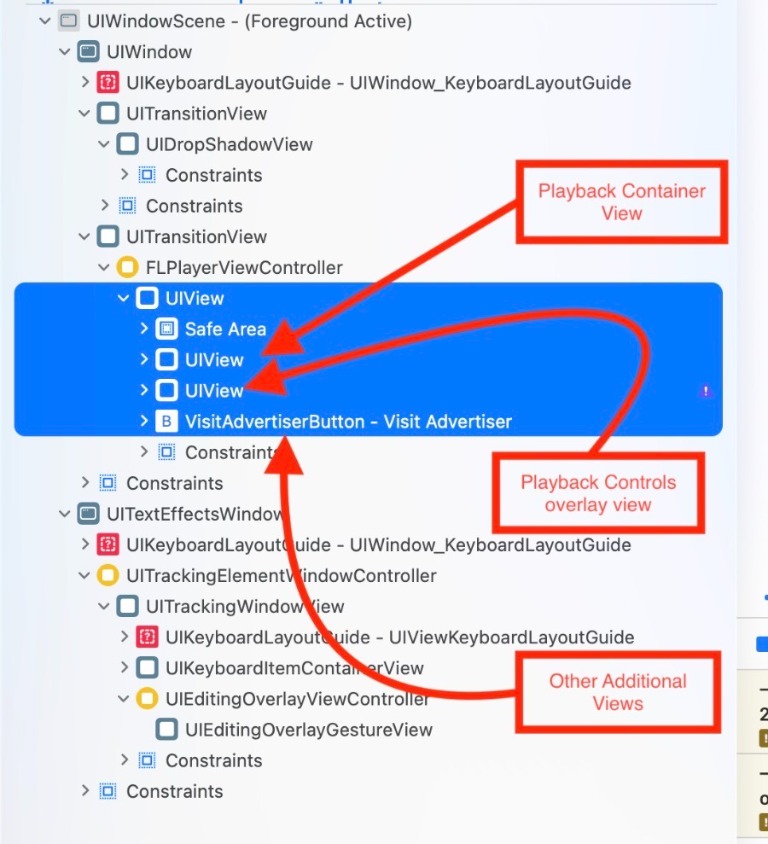
The recommended app hierarchy for MediaTailor obstruction tracking is shown below:
Reference implementation pattern
const friendlyObstructions: AdOverlayUIScope[] = [];

// playerControlOverlayView identifier

if (Platform.OS === 'android') {
  friendlyObstructions.push({
    obstructionID: { type: 'nativeID', id: 'playerControls' },
    purpose: 'playbackControls',
    reason: 'Player controls overlay',
  });
} else {
  friendlyObstructions.push({
    obstructionID: { type: 'viewID', id: playerControlOverlayViewId || 0 },
    purpose: 'playbackControls',
    reason: 'Player controls overlay',
  });
}

if (playerConfig && playerContainerViewId) {
  playerConfig.friendlyObstructions = friendlyObstructions;
  playerConfig.mtSessionConfiguration = {
    ...playerConfig.mtSessionConfiguration,
    reportingMode: getReportingMode(mode, configID, playerContainerViewId),
  };
}
App-side recommendations
- Ensure
playerControlOverlayViewis a true overlay on top ofQpNxgPlaybackViewand is rendered as a sibling of the player container under the same parent layout. - Under that parent layout, keep
playerContainerand the relevant sibling views together; any sibling views that belong to the player hierarchy should also be registered for obstruction detection. - Resolve the relevant sibling view IDs inside
onLayoutcallbacks and gate player creation untilplayerContainerViewIdand the required sibling view IDs are available. - Avoid passing
viewID: 0on iOS/tvOS; this usually means layout has not completed. - Keep
purposeandreasonaccurate and stable (playbackControls,Player controls overlay) to simplify QA/debugging. - Register only real interactive UI obstructions (transport controls, ad-close buttons). Decorative or non-interactive layers may be rendered, but do not register them as friendly obstructions.
Common mistakes to avoid
- Creating the player first, then assigning
friendlyObstructions. - Missing
nativeIDon Android controls when usingtype: 'nativeID'. - Computing
playerViewIDfrom a non-root or mismatched player container. - Changing overlay hierarchy dynamically without revalidating IDs.
⚠️ Important: Always validate friendly obstruction behavior using a Release build of the app. Do not rely only on Debug build results for final verification.
Datazoom Server Mode Configuration
playerConfig.mtSessionConfiguration = {
  ...playerConfig.mtSessionConfiguration,
  reportingMode: {
    mode: 'server',
    configID: '<config-id>',
    playerViewID: playerViewId
  }
};
playerConfig.mtSessionConfiguration = {
  ...playerConfig.mtSessionConfiguration,
  reportingMode: {
    mode: 'client',
    configID: '<config-id>',
    playerViewID: playerViewId
  }
};
Obtaining playerViewID from player container
The playerViewID must be obtained from the player container (the root view that wraps QpNxgPlaybackView). Use React Native's findNodeHandle to get the native view reference.
Step 1: Create a ref for the player container
import { findNodeHandle } from 'react-native';

const playerContainerRef = useRef<View>(null);
const playerControlsRef = useRef<View>(null);
Step 2: Set up the player container hierarchy
The player container must have the same dimensions as the playback view. Use the following view structure:
<View ref={playerContainerRef} nativeID="playerContainer">
  <QpNxgPlaybackView playerID={state.playerID} />
</View>
Step 3: Obtain playerContainerViewId
const playerContainerViewId = findNodeHandle(playerContainerRef.current);
Step 4: Configure reporting mode with the obtained viewId
if (playerContainerViewId) {
  playerConfig.mtSessionConfiguration = {
    ...playerConfig.mtSessionConfiguration,
    reportingMode: {
      mode: 'client',
      configID: '<your-analytics-config-id>',
      playerViewID: playerContainerViewId
    }
  };
}
⚠️ Important: Ensure player container dimensions match the
QpNxgPlaybackViewdimensions exactly for accurate ad tracking measurements.
Configure PAL (Programatic Access Libraries)
The Programmatic Access Libraries (PAL) are small-scale libraries that let you request programmatic ads in environments.
| Property | Type | Required | Description |
|---|---|---|---|
palConfiguration | PALConfiguration | False | Sets the PALConfiguration instance that is used in the PALSession initialization. Optionally sets the permission to store user data like cookies, device IDs, and advertising IDs when using PALSession calls. |
Configure Ad playback policies
The following ad playback policies represent the default MediaTailor player behavior for VOD (Video on Demand) content. These defaults define how ads are enforced when users perform actions such as fast-forwarding, rewinding, repeating playback, interrupting playback, or auto-seeking to a bookmarked position.
| Property | Type | Required | Default | Description |
|---|---|---|---|---|
fastForwardRule | String | False | AUTO_SEEK_SKIP_ALL | Rules that enforce ad playback policy when a user performs fast forward operation. |
rewindRule | String | False | TRICK_FW_PLAY_LAST | Rules that enforce ad playback policy when a user performs rewind operation. |
repeatRule | String | False | INTERRUPT_RESUME | Rules that enforce ad playback for repeated ad playback in a single playback session. |
interruptRule | String | False | REPEAT_PLAY_ONCE | Rules that enforce ad playback policy when the playback is interrupted. |
autoSeekRule | String | False | TRICK_RW_SKIP_ALL | Rules that enforce ad playback policy when a user has a "bookmarked" time for a piece of content, then plays the content again, and the player auto-seeking to the bookmark triggers the ads. |
Customizing Playback Policies
If you need to override the default MediaTailor playback policies, you can do so by explicitly configuring them in PlayerConfig:
let playerConfig: PlayerConfig = {
  ...
  fastForwardRule: <fast-forward rule>,
  rewindRule: <rewind rule>,
  repeatRule: <repeat rule>,
  interruptRule: <interrupt rule>,
  autoSeekRule: <auto seek rule>
};
⚠️ Important: Any change from the default MediaTailor playback policy values must undergo full regression testing. Modifying these rules can impact ad delivery, measurement, and compliance behavior during VOD playback.
ℹ️ Note: playback policies applicable only for VOD
Ad Interaction APIs
send Ad Click
The sendAdClick method should be invoked when the user interacts with an ad click tracking event. This notifies the player about the ad click. If the ad contains a videoClickThroughURL, the application can use it to open the URL in a browser or handle it as needed.
onAdStart(adInfo: AdPlayerAdInfo): void {
  let videoClickThroughURL = adInfo.vastProperties?.videoClickThroughURL;
}
// This method should be used only when videoClickThroughURL exists
player.sendAdClick();
On Video View Touch
The onVideoViewTouch method should be called for every touch interaction with the player. This allows the player to handle touch events for ad interactions.
action: The type of motion event (e.g.,ACTION_DOWN,ACTION_UP, etc.).x: The x-coordinate of the touch event.y: The y-coordinate of the touch event.
Example:
enum MotionEventAction {
  ACTION_DOWN = 0,
  ACTION_UP = 1,
  ACTION_MOVE = 2,
  ACTION_CANCEL = 3,
}

const handleTouch = (touchType: number, gestureResponderEvent: any) => {
  const { locationX, locationY } = gestureResponderEvent.nativeEvent;
  player?.onVideoViewTouch(touchType, locationX, locationY);
};

const onTouchStart = (gestureResponderEvent: any) => handleTouch(MotionEventAction.ACTION_DOWN, gestureResponderEvent);
const onTouchMove = (gestureResponderEvent: any) => handleTouch(MotionEventAction.ACTION_MOVE, gestureResponderEvent);
const onTouchEnd = (gestureResponderEvent: any) => handleTouch(MotionEventAction.ACTION_UP, gestureResponderEvent);
const onTouchCancel = (gestureResponderEvent: any) => handleTouch(MotionEventAction.ACTION_CANCEL, gestureResponderEvent);

// This Pressable must be part of the player view to receive touch events
<Pressable
  onTouchStart={onTouchStart}
  onTouchMove={onTouchMove}
  onTouchEnd={onTouchEnd}
  onTouchCancel={onTouchCancel}
></Pressable>
Note: These APIs are critical for tracking user interactions with ads and ensuring proper ad behavior.